
API Keys Management
How to create, edit and update API secret/key pairs
API credentials can be managed directly from the Naewe Dashboard by users with the Manager or Admin or custom roles with the relevant permission. To create API credentials go to "Settings -> API keys" and click on the “New Key” button. Here you can provide a name (alias) for the key/secret pair and select the permissions that are relevant to your use-case. Your 2FA code will also be required as a step of the key creation process. Due to security concerns, we also require IPs to be whitelisted. If we receive a request from an IP that was not listed for the API pair, we will reject it returning a 403 (Forbidden) HTTP status code.
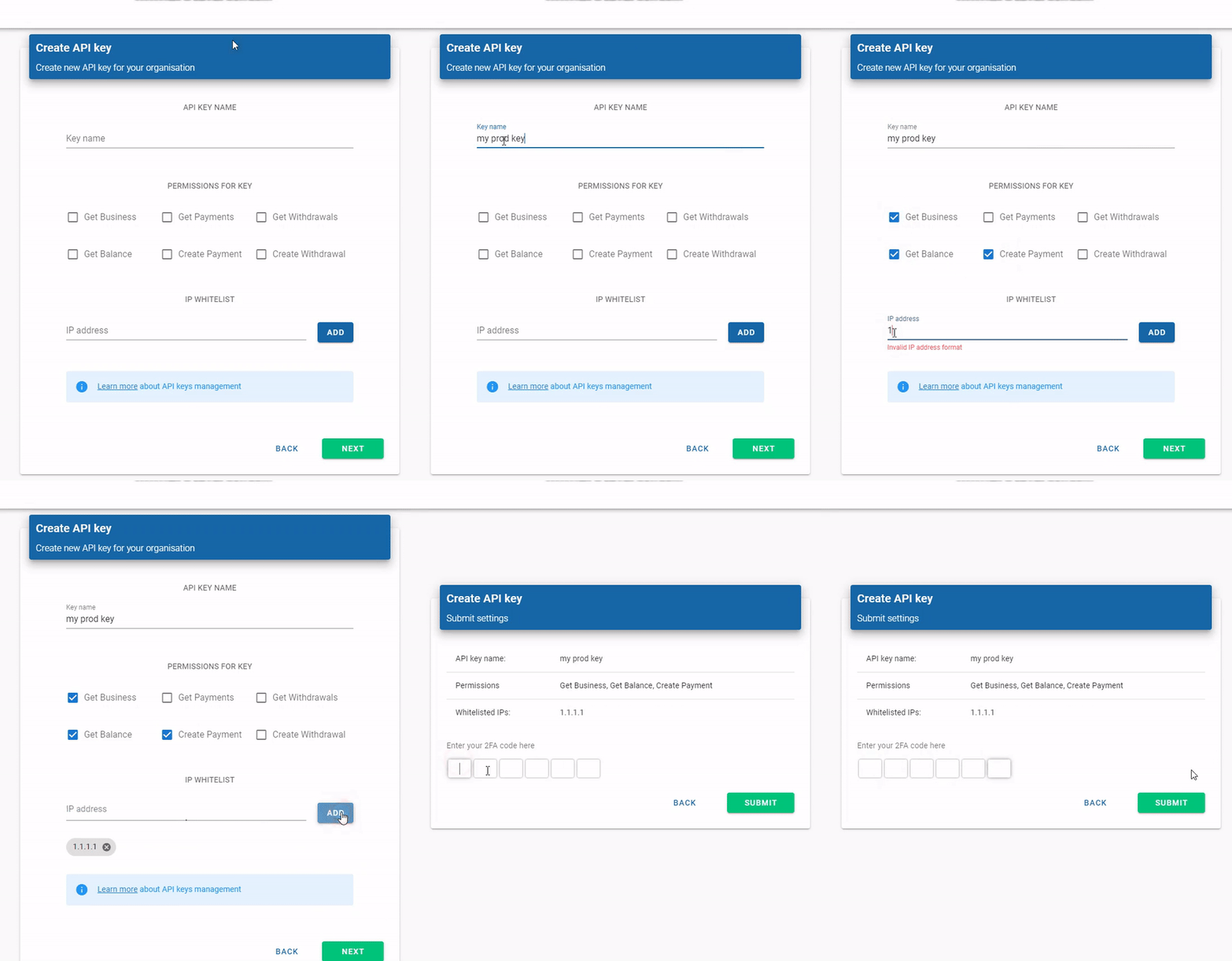
Upon successful API credentials creation, you will be provided with the values for the API key and API secret. At this stage, you must store the API secret securely, e.g. by writing it down or copying it in a trusted store as this is the only time the API secret will be displayed. Once created the API key and secret are immutable, however, the IP white-list and permissions can be edited at any time.
If you lose your API secret or it becomes compromised you must delete the API credentials pair immediately and generate a new one. If you find out that the access to the dashboard has been compromised, please contact us immediately.
Last updated